Nimm in Logic auf — per Sprache. Record in Logic — by voice.
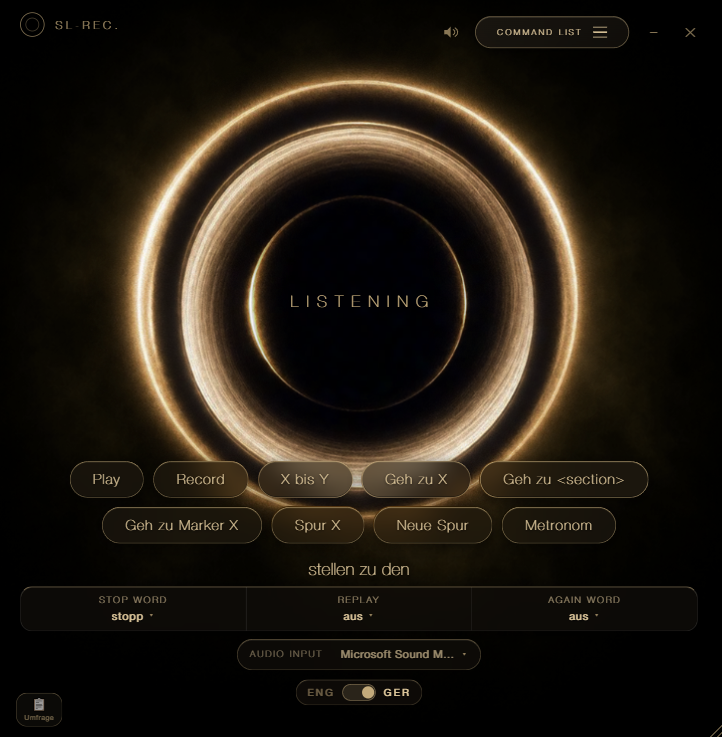
SL-REC. macht das Aufnehmen in Logic freihändig – du sprichst, statt zu klicken. Es ist Teil meiner Bachelorthesis, die untersucht, wie Sprachsteuerung den Aufnahmeprozess verändert. Komplett offline. SL-REC. makes recording in Logic hands-free – you speak instead of click. It's part of my bachelor thesis exploring how voice control changes the recording process. Fully offline.
Installation GuideInstallation Guide
Installations-Anleitung anzeigenShow installation guide Anleitung ausblendenHide guide
InstallierenInstall
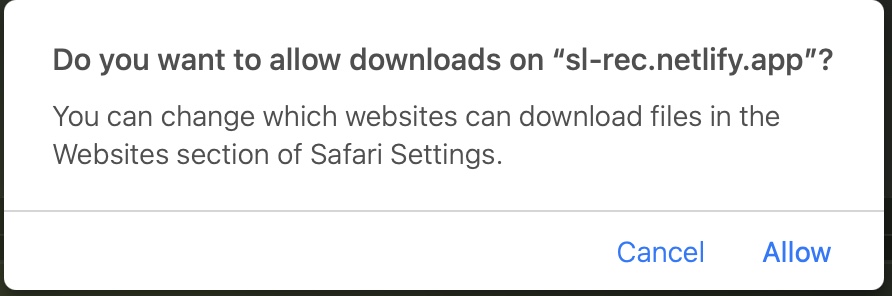
- Download erlauben: Fragt Safari beim Laden „Möchtest du Downloads auf ‚sl-rec.netlify.app' erlauben?", auf „Erlauben" klicken.Allow the download: If Safari asks "Do you want to allow downloads on ‘sl-rec.netlify.app'?", click "Allow".
- Installieren: Doppelklick auf
SL-REC.dmg, App in den Programme-Ordner ziehen.Install: Double-clickSL-REC.dmgand drag the app into Applications. - Admin bestätigen: Beim Rüberziehen fragt macOS nach deinem Mac-Passwort (Admin-Rechte) → eingeben & bestätigen.Confirm as admin: While copying, macOS asks for your Mac password (admin rights) → enter it & confirm.
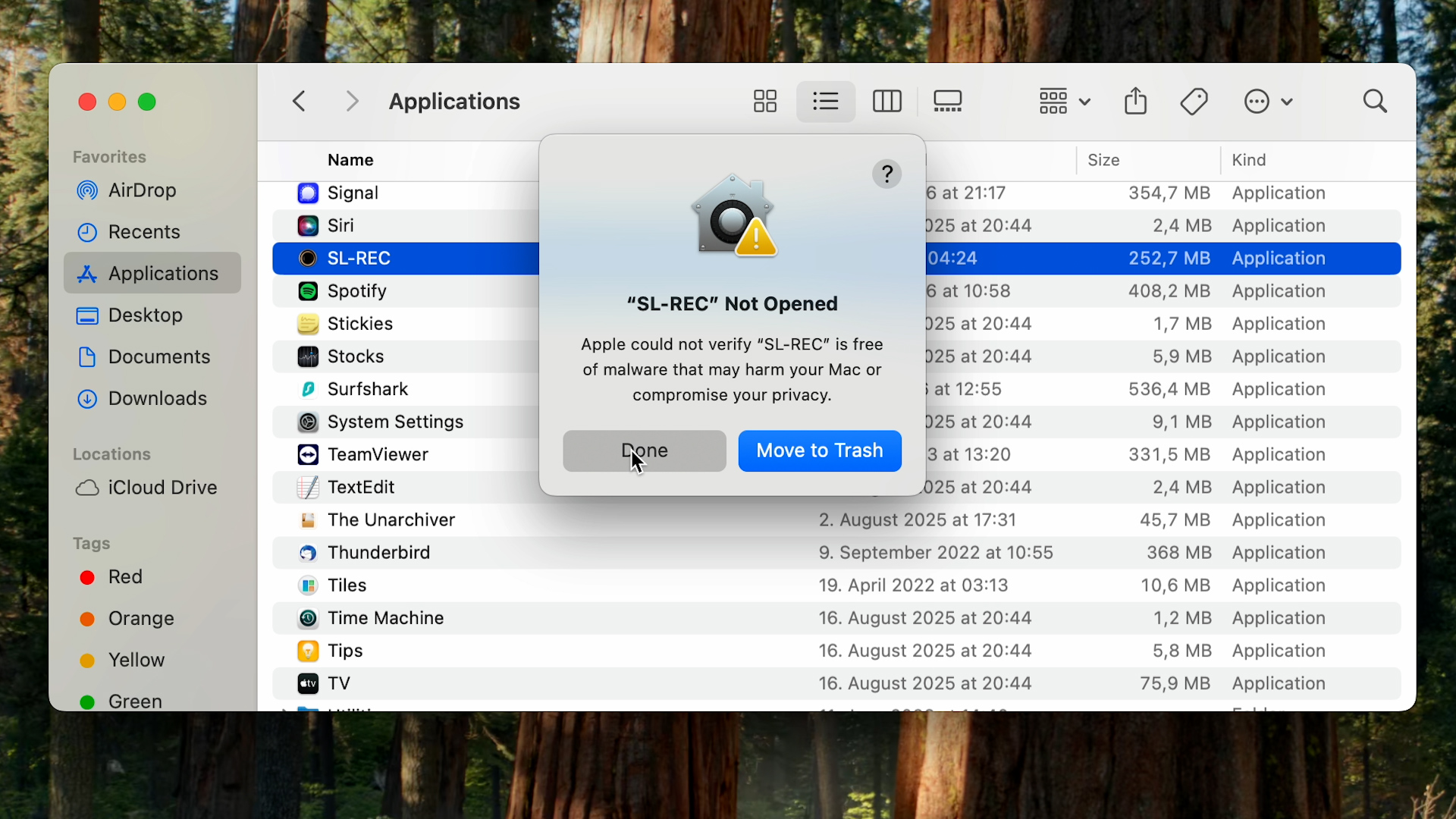
Erster Start: SL-REC. freigebenFirst launch: allow SL-REC.
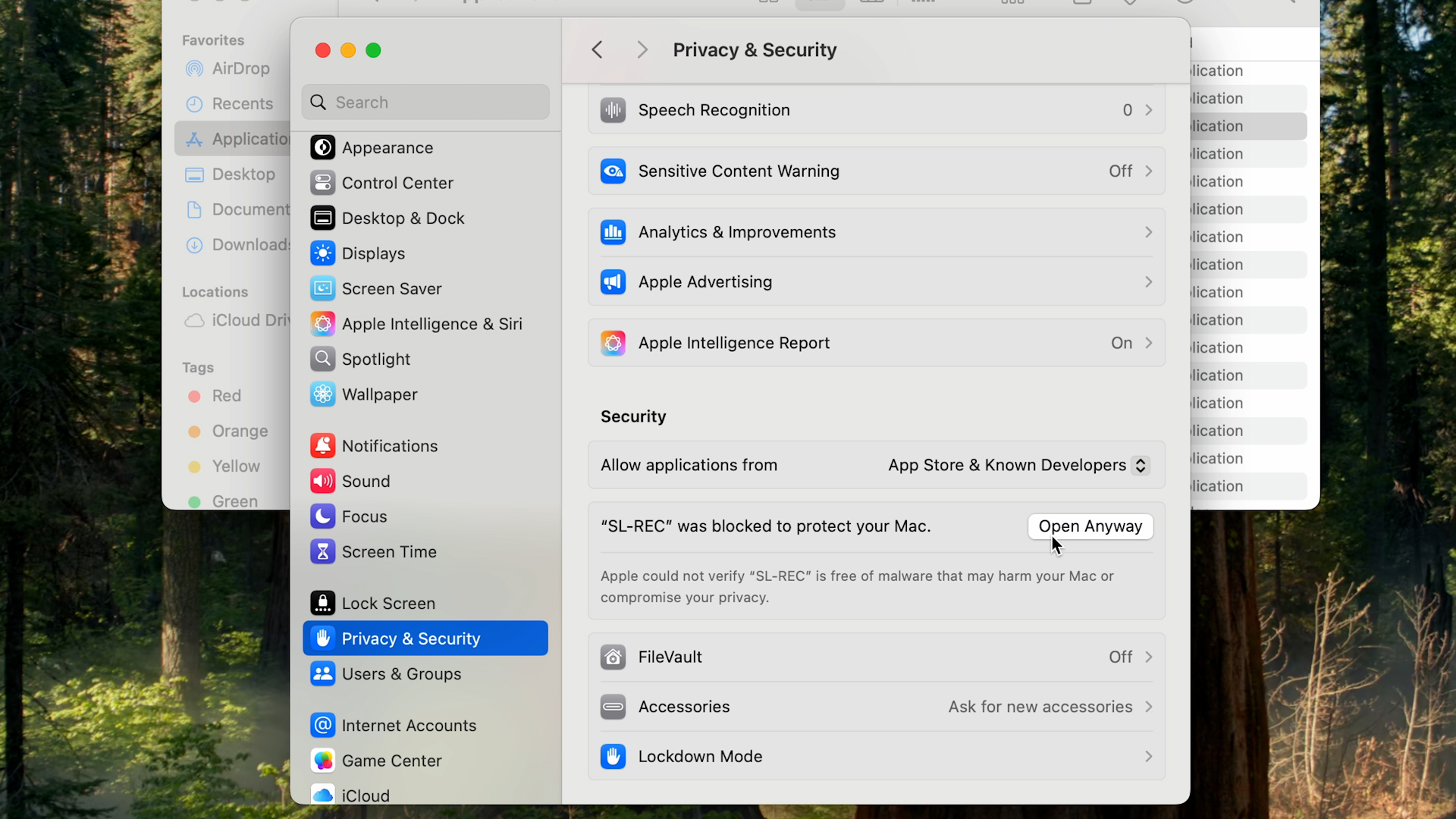
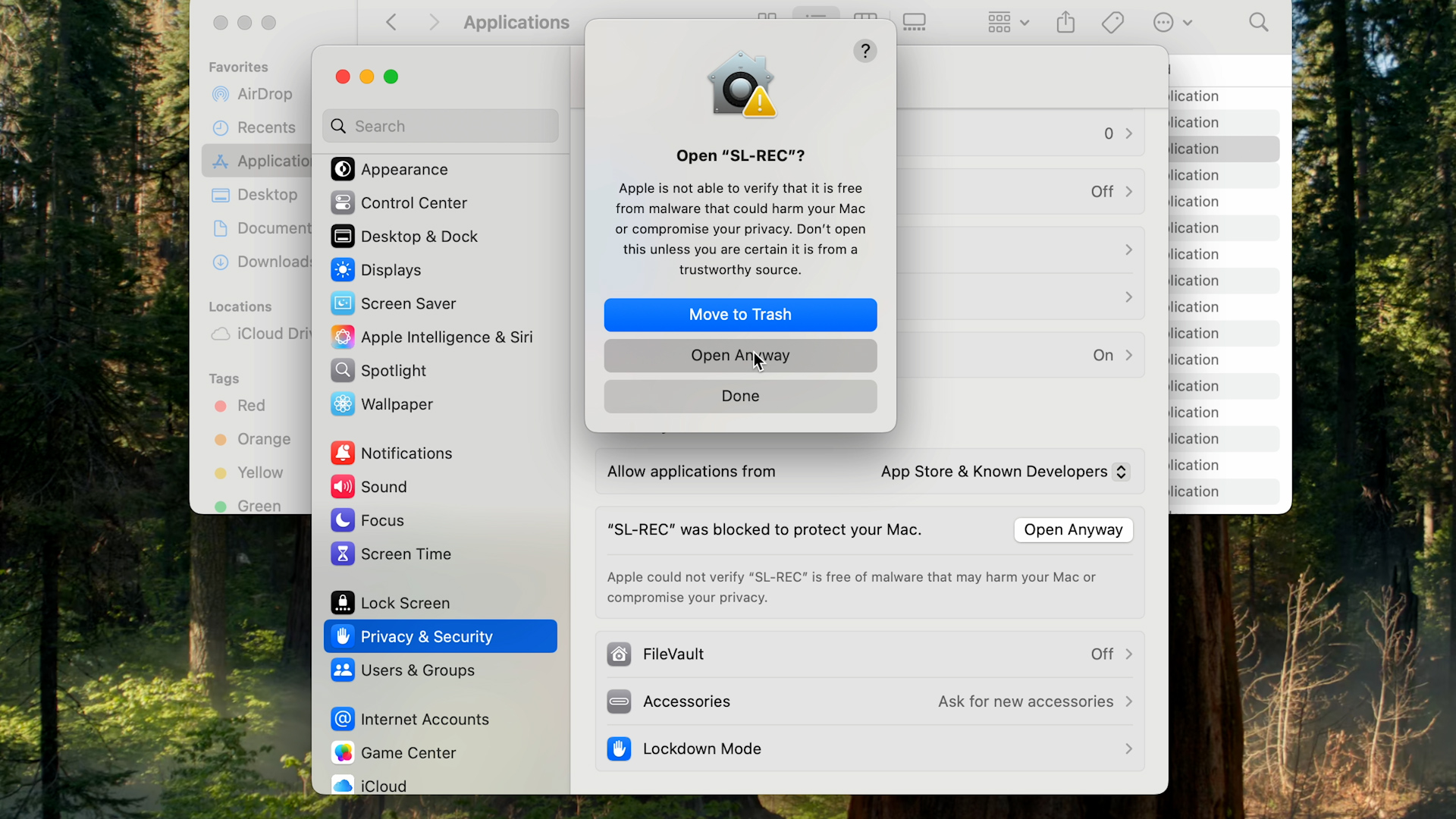
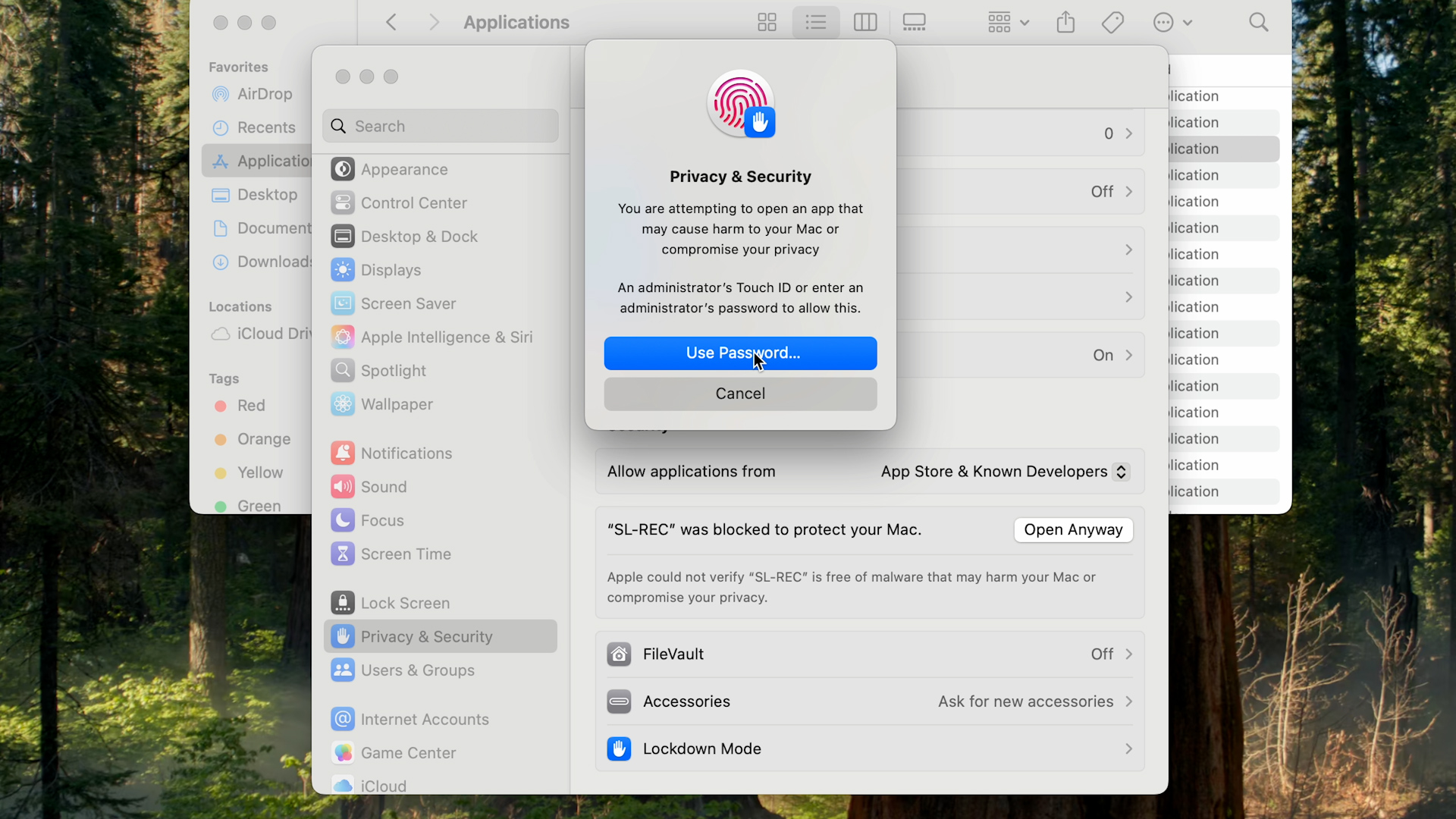
Beim ersten Öffnen blockiert macOS die App – normal bei Apps ohne Apple-Zertifikat und harmlos. Einmal freigeben, danach startet sie immer per Doppelklick.On first launch macOS blocks the app – normal for apps without an Apple certificate and harmless. Allow it once; after that it always opens with a double-click.
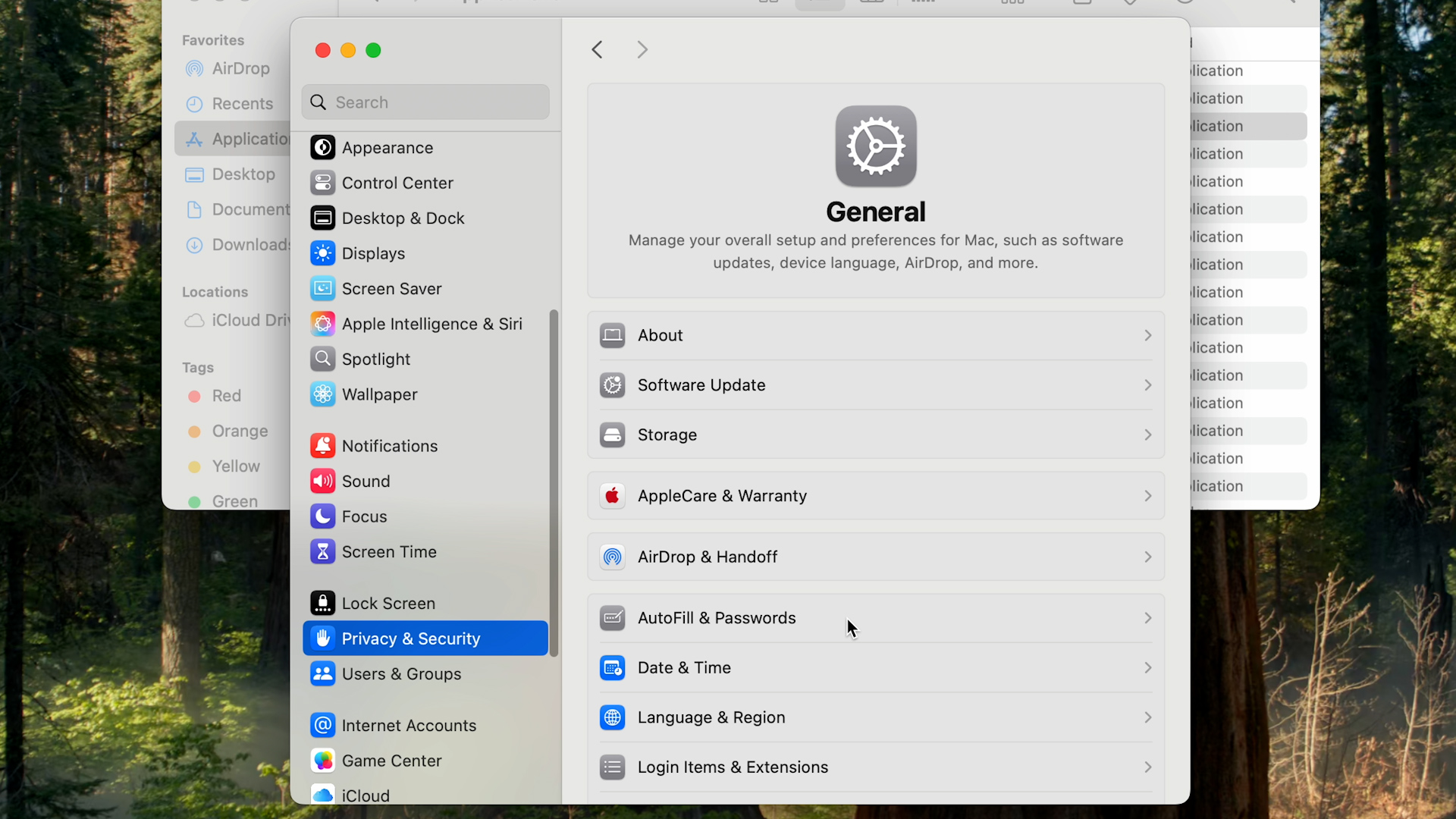
Bedienungshilfen erlaubenAllow Accessibility access
SL-REC. öffnet die Einstellungsseite beim Setup automatisch. Dann:SL-REC. opens the settings page automatically during setup. Then:
- In der Liste den Schalter neben „SL-REC." einschalten. Nicht sichtbar? Kurz scrollen.Turn on the switch next to "SL-REC." in the list. Not visible? Scroll briefly.
- macOS fragt nach deinem Mac-Passwort → eingeben, das ist normal.macOS asks for your Mac password → enter it, that's normal.
- SL-REC. wieder öffnen – das Setup macht dort weiter.Reopen SL-REC. – setup continues from there.
Die App darf sich bei diesem Schritt einmal beenden – das gehört zum Setup.The app may quit once during this step – that's part of the setup.
MIDI-Treiber aktivieren (einmalig)Enable the MIDI driver (one-time)
Im Fenster „Audio-MIDI-Setup", das sich automatisch öffnet:In the "Audio MIDI Setup" window that just opened:
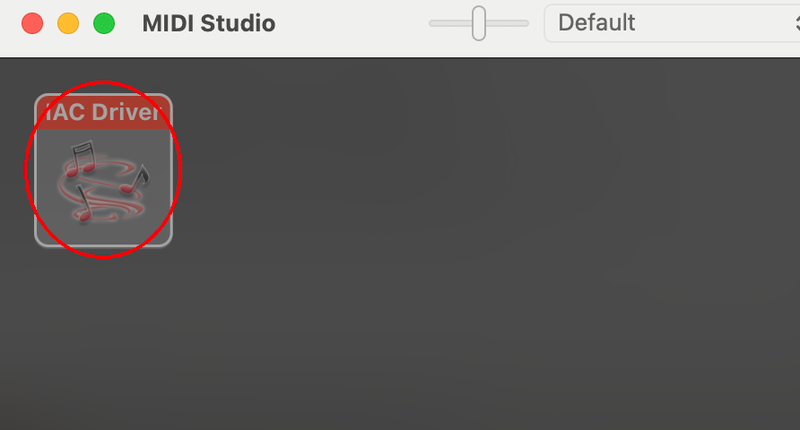
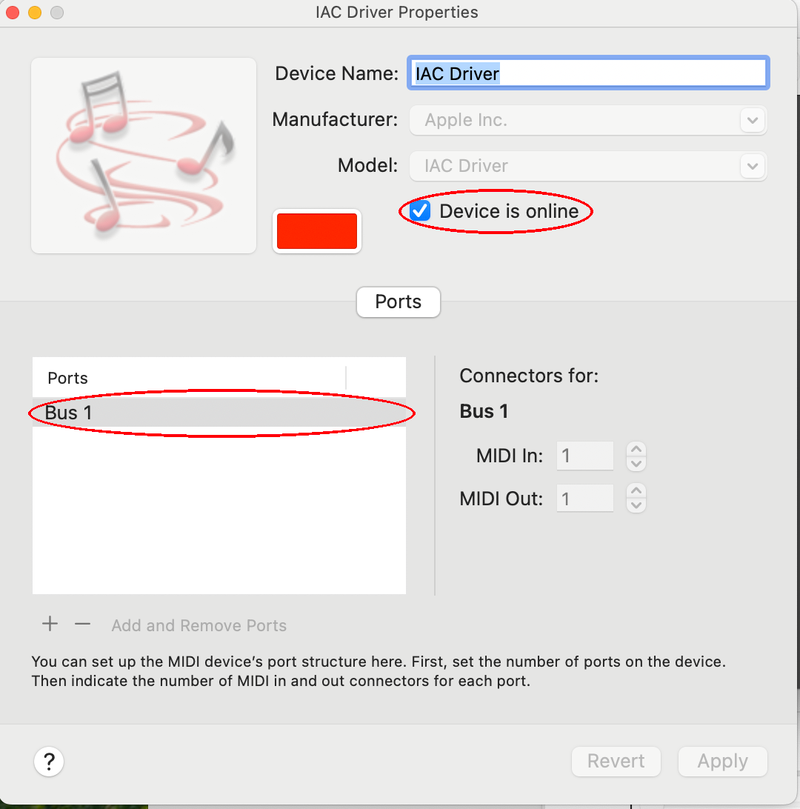
Sobald das Häkchen gesetzt ist: im SL-REC.-Fenster auf „OK" klicken.Once the box is checked: click "OK" in the SL-REC. window.
Logic-Projekt mit SL-REC. verbindenConnect your Logic project to SL-REC.
Am einfachsten: neues Projekt aus der Vorlage SL-REC-Session anlegen (Ablage → Neu (⌘+N) → Meine Vorlagen). Für ein bestehendes Projekt:Easiest: create a new project from the SL-REC-Session template (File → New (⌘+N) → My Templates). For an existing project:
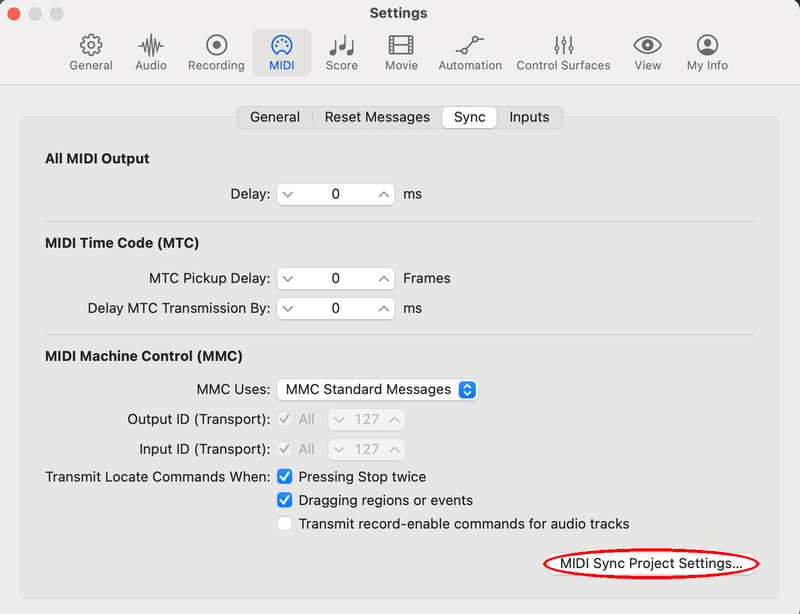
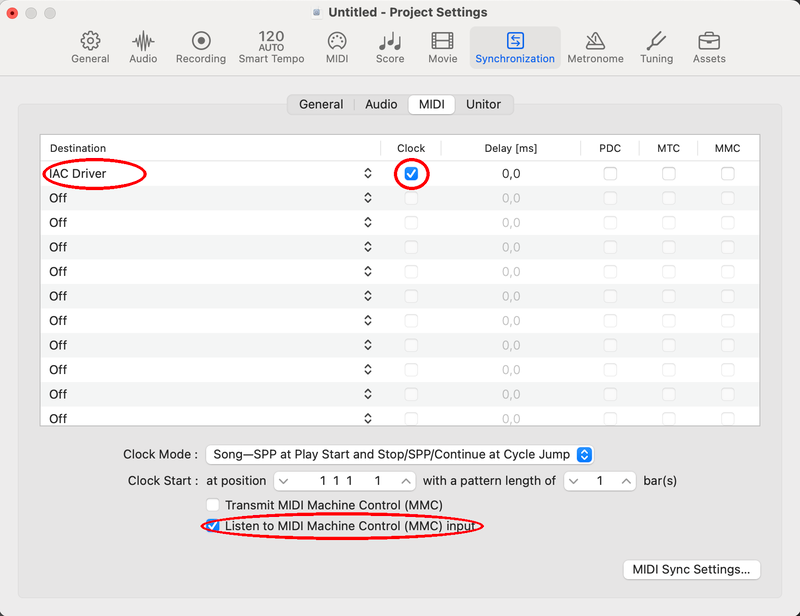
Danach einmal Play in Logic drücken – fertig.Then press Play in Logic once – done.
Loslegen & UmfrageGet going & survey
Du bist startklar. Die kurze Umfrage führt dich durch alles.You're set. The short survey walks you through everything.
Zur Umfrage →To the survey →Etwas hat nicht geklappt?Something didn't work?
macOS lässt SL-REC. nicht öffnen / SicherheitsmeldungmacOS won't open SL-REC. / security message
macOS meldet beim ersten Start, es könne den Entwickler nicht überprüfen, und blockiert die App. Das ist bei Programmen ohne teures Apple-Zertifikat normal – SL-REC. ist sicher. Du bestätigst es nur einmal; danach öffnet die App immer per normalem Doppelklick.On first launch macOS says it can't verify the developer and blocks the app. This is normal for apps without an expensive Apple certificate – SL-REC. is safe. You confirm it just once; after that the app opens with a normal double-click.
- Meldung wegklicken: Doppelklick auf SL-REC. im Programme-Ordner. Erscheint „Apple konnte nicht überprüfen…", auf „Fertig" klicken – nicht „In den Papierkorb".Dismiss the message: Double-click SL-REC. in Applications. When "Apple could not verify…" appears, click "Done" – not "Move to Trash".
- „Dennoch öffnen": Systemeinstellungen → Datenschutz & Sicherheit öffnen, ganz nach unten scrollen. Bei „‚SL-REC.' wurde blockiert…" auf „Dennoch öffnen" klicken, mit Touch ID/Passwort bestätigen."Open Anyway": Open System Settings → Privacy & Security, scroll to the bottom. Next to "‘SL-REC.' was blocked…" click "Open Anyway" and confirm with Touch ID/password.
- Endgültig öffnen: Im letzten Dialog auf „Öffnen" klicken. Fertig – die Meldung kommt nie wieder.Open for good: In the final dialog click "Open". Done – the message never comes back.
Am Mac? Sicherheitseinstellungen direkt öffnen →On your Mac? Open Security settings directly →
MIDI-Treiber (IAC) ist nicht aktiv / Fenster verpasstMIDI driver (IAC) not enabled / missed the window
Normalerweise öffnet SL-REC. das Fenster „Audio-MIDI-Setup" beim Setup automatisch. Falls du es weggeklickt hast: Programme → Dienstprogramme → Audio-MIDI-Setup öffnen. Dann:Normally SL-REC. opens the "Audio MIDI Setup" window automatically during setup. If you dismissed it: open Applications → Utilities → Audio MIDI Setup. Then:
Danach im SL-REC.-Fenster auf „OK" klicken.Then click "OK" in the SL-REC. window.
Logic reagiert nicht auf SL-REC. / Projekt verbindenLogic doesn't respond to SL-REC. / connect your project
Am einfachsten: neues Projekt aus der Vorlage SL-REC-Session anlegen (Ablage → Neu (⌘+N) → Meine Vorlagen) – dort ist schon alles eingestellt. Bei einem bestehenden Projekt müssen die MIDI-Sync-Einstellungen pro Projekt gesetzt sein:Easiest: create a new project from the SL-REC-Session template (File → New (⌘+N) → My Templates) – everything is already set up there. For an existing project, the MIDI sync settings must be set per project:
Danach einmal Play in Logic drücken. Reagiert es immer noch nicht? Prüfe, ob der IAC-Treiber aktiv ist.Then press Play in Logic once. Still not responding? Check that the IAC driver is enabled.
Sprache wird nicht erkanntVoice isn't recognised
- Unten im Fenster das richtige Mikrofon gewählt?Is the correct microphone selected at the bottom?
- Nicht zu leise sprechen; sehr laute Umgebung kann stören.Don't speak too quietly; a very loud room can interfere.
Mikrofon-Berechtigung – je nach System:Microphone permission – depends on your system:
macOS
- Beim ersten Start fragt macOS in einem kleinen Fenster → auf „Erlauben"/„OK" klicken.On first launch macOS asks in a small dialog → click "Allow"/"OK".
- Versehentlich abgelehnt? Systemeinstellungen → Datenschutz & Sicherheit → Mikrofon → SL-REC. aktivieren, App neu starten.Declined by accident? System Settings → Privacy & Security → Microphone → enable SL-REC., restart the app.
Windows
- Kein Erlaubnis-Popup – Windows regelt das global in den Einstellungen.No permission popup – Windows handles it globally in Settings.
- Windows-Einstellungen → Datenschutz & Sicherheit → Mikrofon.Windows Settings → Privacy & security → Microphone.
- „Mikrofonzugriff" an und „Desktop-Apps den Zugriff auf Ihr Mikrofon erlauben" einschalten, App neu starten.Turn on "Microphone access" and "Let desktop apps access your microphone", then restart the app.
⌁ Weitere Fehler & Lösungen folgen nach den Tests. Problem nicht dabei? Schreib mir – dann nehme ich es auf.⌁ More issues & fixes will follow after testing. Problem not listed? Let me know and I'll add it.
ProfilProfile
Hi, ich bin Jannes — ich studiere Sound and Music Production an der Hochschule Darmstadt. SL-REC. ist meine Bachelorarbeit: Ich mache selbst Musik und wollte das Aufnehmen flüssiger machen, ohne ständig zur Maus oder Tastatur zu greifen. Und nebenbei soll SL-REC. das Aufnehmen auch denen öffnen, die mit Maus und Tastatur nicht gut zurechtkommen – etwa bei motorischen Einschränkungen.Hi, I'm Jannes — I study Sound and Music Production at Hochschule Darmstadt. SL-REC. is my bachelor's thesis: I make music myself and wanted recording to flow without constantly reaching for mouse or keyboard. And along the way, SL-REC. is meant to open recording up to people who can't comfortably use a mouse and keyboard – for instance with motor impairments.
Deshalb freue ich mich über jeden, der es testet und mir kurz Feedback gibt. 🙏So I'm grateful to anyone who tests it and shares quick feedback. 🙏
Offline & privatOffline & private
Spracherkennung läuft lokal (Vosk). Keine Cloud, keine Internetverbindung.Recognition runs on-device (Vosk). No cloud, no internet.
Hochschul-ProjektUniversity project
Bachelor-of-Arts-Arbeit zur Sprachsteuerung. Kein kommerzielles Tracking.A Bachelor of Arts thesis on voice control. No commercial tracking.
Nur für MacMac only
Läuft mit Logic Pro auf macOS. Kein Zusatz-Plugin nötig.Works with Logic Pro on macOS. No extra plugin needed.
Schnell startklarQuick to set up
Der Installer legt alles an die richtige Stelle. Nur ein Klick in Logic bleibt.The installer puts everything in place. Just one click in Logic left.
Teste mit – jede Umfrage hilft.Test it – every survey helps.
SL-REC. ist mein Bachelor-Projekt. Ich wäre wirklich dankbar für jeden, der es testet. Die kurze Umfrage geht schnell – und dein Feedback hilft mir riesig. 🙏SL-REC. is my bachelor project. I'd be truly grateful to everyone who tests it. The short survey is quick – and your feedback means a lot. 🙏
Zur Umfrage →Take the survey →