Nimm in Ableton auf — per Sprache. Record in Ableton — by voice.
SL-REC. macht das Aufnehmen in Ableton freihändig – du sprichst, statt zu klicken. Es ist Teil meiner Bachelorthesis, die untersucht, wie Sprachsteuerung den Aufnahmeprozess verändert. Komplett offline. SL-REC. makes recording in Ableton hands-free – you speak instead of click. It's part of my bachelor thesis exploring how voice control changes the recording process. Fully offline.
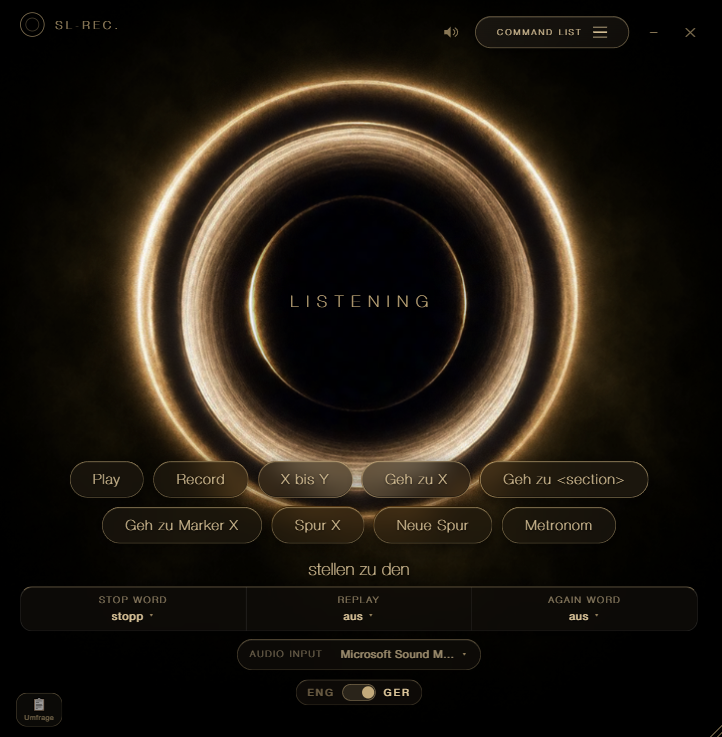
Installation GuideInstallation Guide
InstallierenInstall
- Starten: Nach dem Download SL-REC-Setup.exe per Doppelklick öffnen und dem Setup-Assistenten folgen.Run: After downloading, double-click SL-REC-Setup.exe and follow the setup assistant.
- SmartScreen-Warnung? „Der Computer wurde geschützt" ist harmlos. Win 11: „Weitere Informationen" → „Trotzdem ausführen". Win 10: „Ausführen".SmartScreen warning? "Windows protected your PC" is harmless. Win 11: "More info" → "Run anyway". Win 10: "Run".
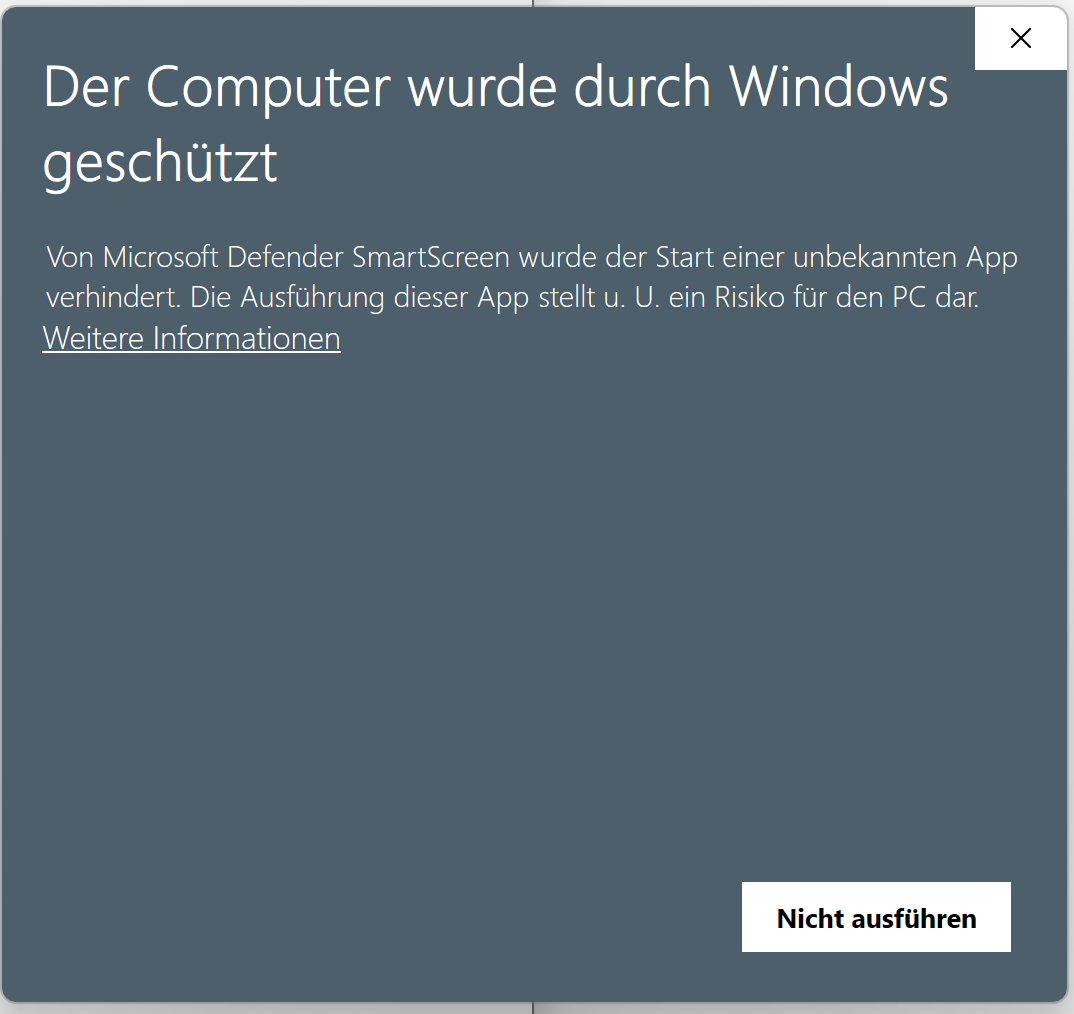
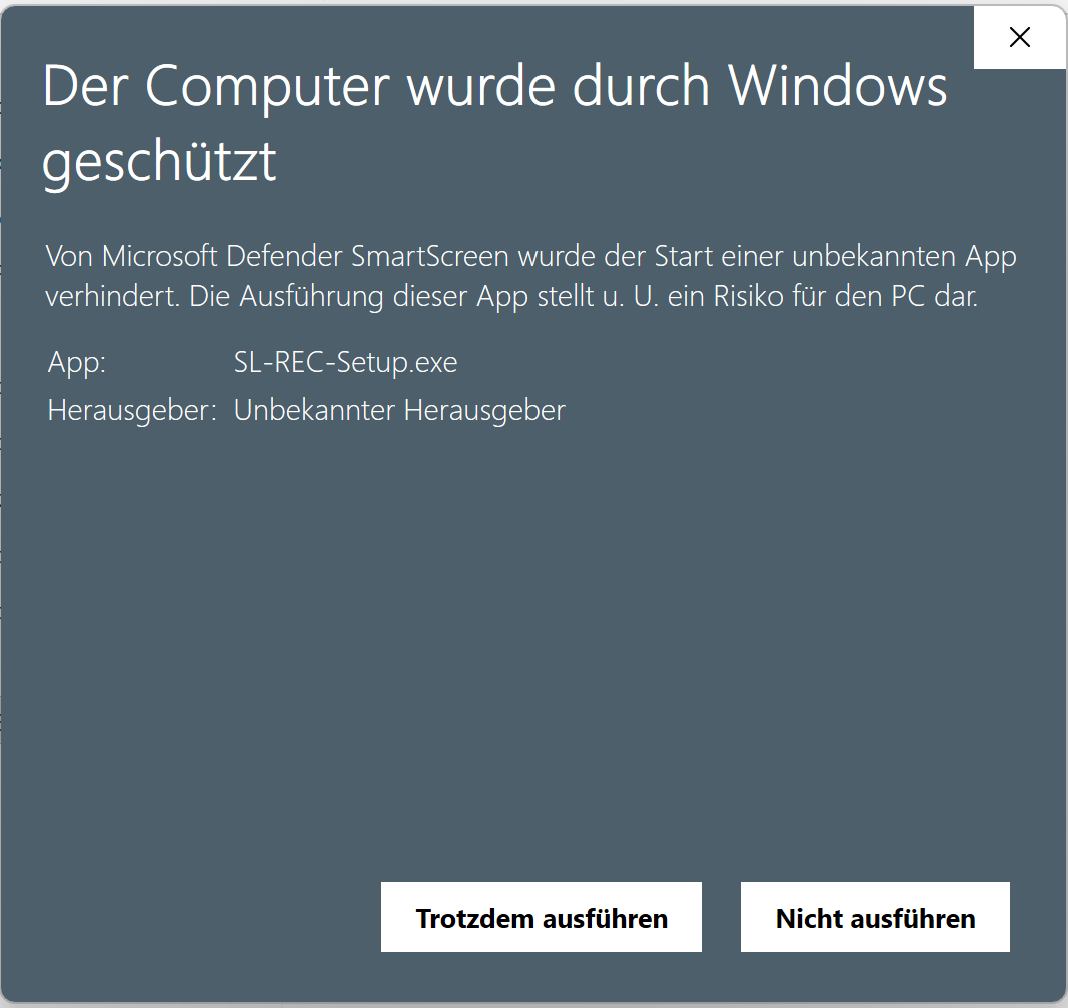
FertigstellenFinish
Gegen Ende des Assistenten den Haken „AbletonOSC in Ableton einrichten (empfohlen)" gesetzt lassen – nur so spricht SL-REC. mit Ableton (Desktop-Verknüpfung ist optional). Dann auf „Fertigstellen" klicken – SL-REC. öffnet sich automatisch. Lass das Fenster offen, wir richten gleich erst Ableton ein.Near the end of the assistant, keep "Set up AbletonOSC in Ableton (recommended)" ticked – that's what lets SL-REC. talk to Ableton (desktop shortcut is optional). Then click "Finish" – SL-REC. opens automatically. Leave the window open, we'll set up Ableton first.
Mikrofon einstellenSet up the microphone
Zurück in SL-REC.: unten im Fenster dein Mikrofon wählen – fertig.Back in SL-REC.: pick your mic at the bottom of the window – done.
Mikrofon fehlt in der Liste / kein Signal?Mic missing from the list / no signal?
Windows-Einstellungen → Datenschutz → Mikrofon → Zugriff für SL-REC. erlauben, App neu starten. Das Mikrofon wählst du unten im Fenster:Windows Settings → Privacy → Microphone → allow access for SL-REC., then restart the app. Pick the mic at the bottom of the window:
Loslegen & UmfrageGet going & survey
Du bist startklar. Die kurze Umfrage führt dich durch alles.You're all set. The short survey walks you through everything.
Zur Umfrage →To the survey →InstallierenInstall
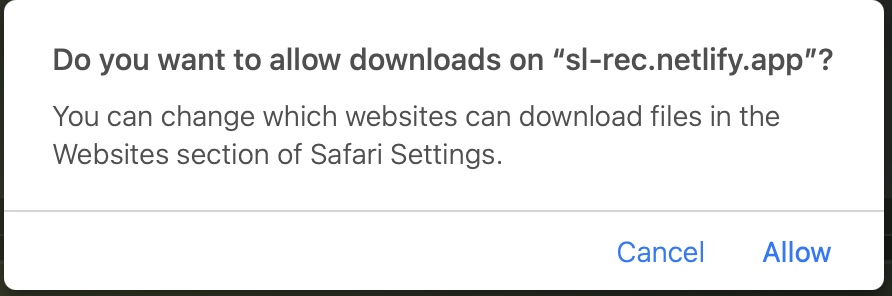
- Download erlauben: Fragt Safari beim Laden „Möchtest du Downloads auf ‚sl-rec.netlify.app' erlauben?", auf „Erlauben" klicken.Allow the download: If Safari asks "Do you want to allow downloads on ‘sl-rec.netlify.app'?", click "Allow".
- Installieren: Doppelklick auf
SL-REC.dmg, App in den Programme-Ordner ziehen.Install: Double-clickSL-REC.dmgand drag the app into Applications. - Admin bestätigen: Beim Rüberziehen fragt macOS nach deinem Mac-Passwort (Admin-Rechte) → eingeben & bestätigen. AbletonOSC wird beim ersten Start automatisch angelegt.Confirm as admin: While copying, macOS asks for your Mac password (admin rights) → enter it & confirm. AbletonOSC is set up automatically on first launch.
Erster Start: SL-REC. freigebenFirst launch: allow SL-REC.
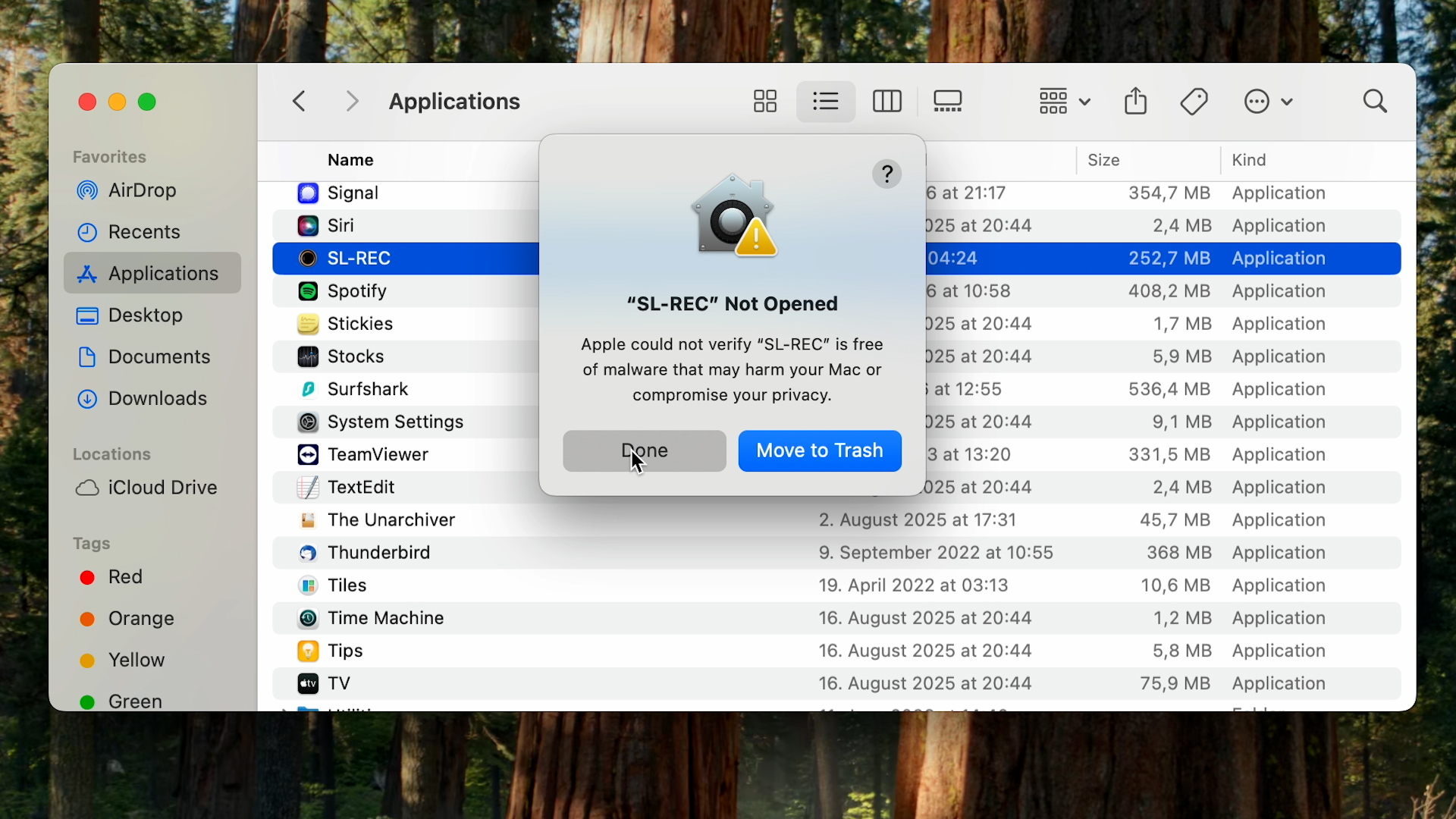
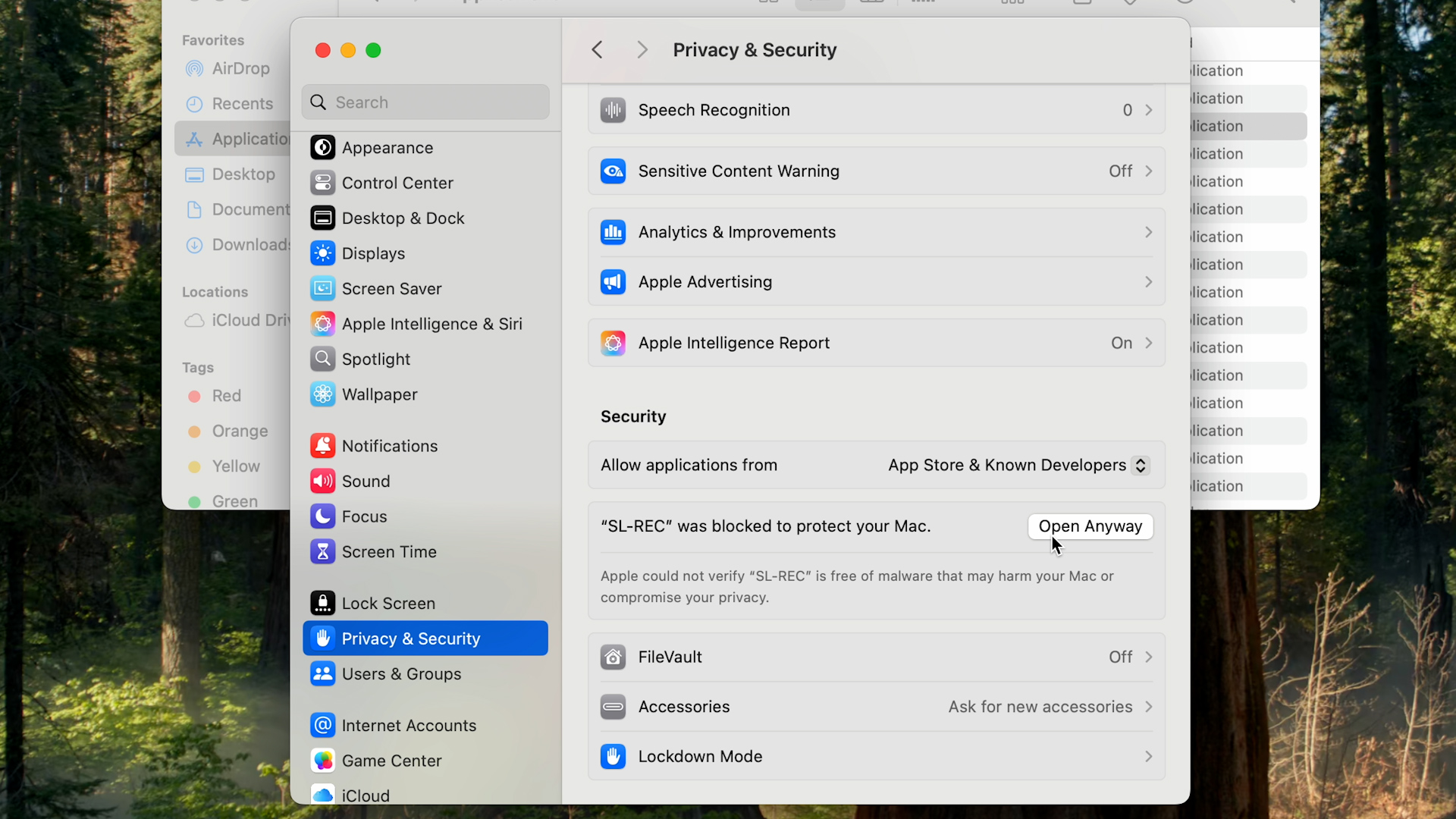
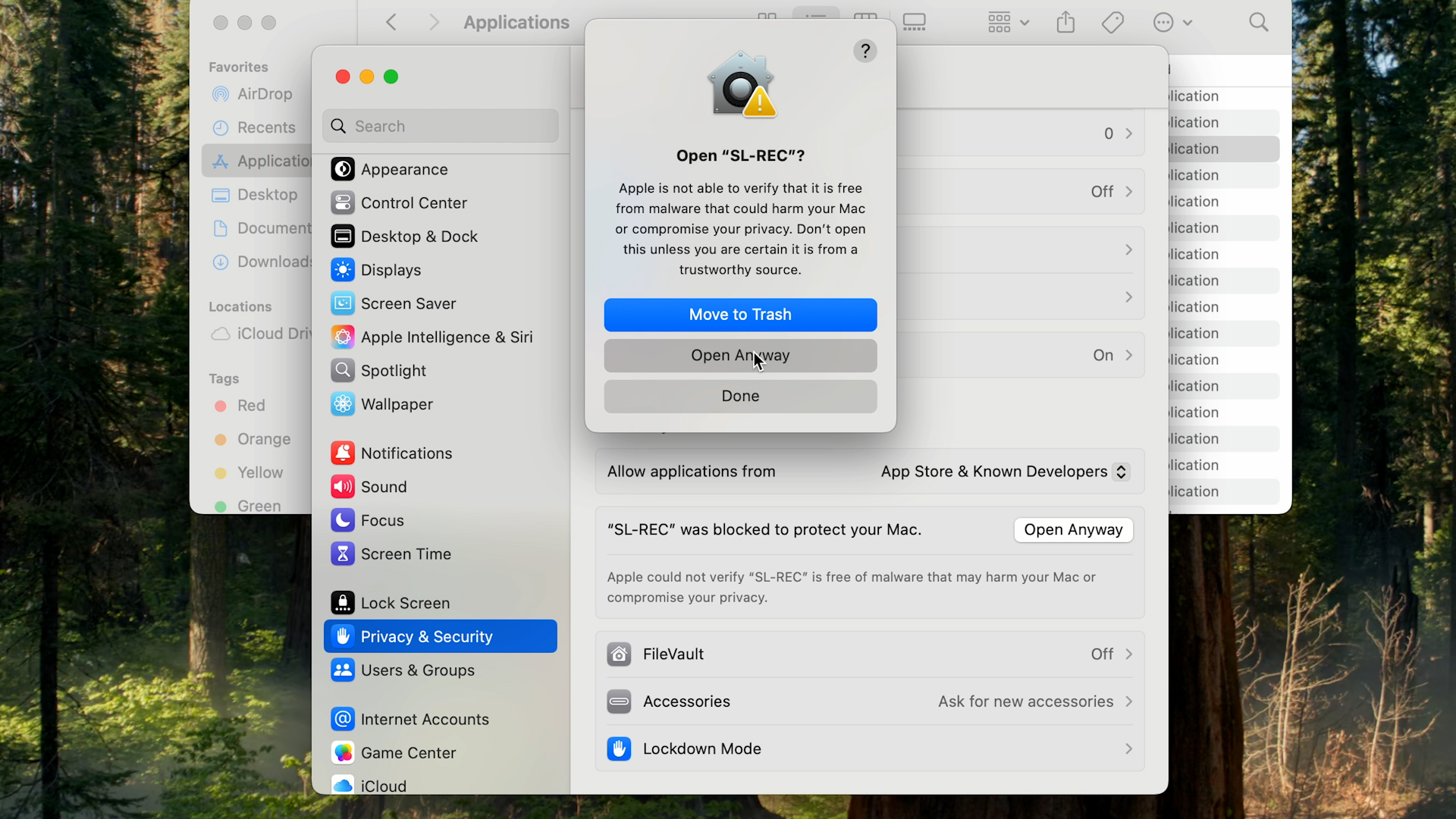
Beim allerersten Öffnen blockiert macOS die App: „Apple konnte nicht überprüfen, ob ‚SL-REC.' frei von Schadsoftware ist." Das passiert bei jeder App ohne teures Apple-Zertifikat und ist harmlos – SL-REC. ist sicher. Du gibst sie einmal frei, danach startet sie immer normal per Doppelklick.On the very first launch macOS blocks the app: "Apple could not verify ‘SL-REC.' is free of malware." This happens with every app without an expensive Apple certificate and is harmless – SL-REC. is safe. You allow it once; after that it always opens with a normal double-click.
Apple-Silicon-Mac (M-Chip) · aktuelles macOSApple Silicon Mac (M chip) · current macOS
Intel-Mac oder älteres macOS (Sonoma 14 oder früher) / Meldung „beschädigt"Intel Mac or older macOS (Sonoma 14 or earlier) / "damaged" message
macOS Sonoma 14 oder früher? Kürzer: Rechtsklick (Ctrl-Klick) auf SL-REC. → „Öffnen" → „Öffnen" – ohne Umweg über die Einstellungen.macOS Sonoma 14 or earlier? Shorter: right-click (Control-click) SL-REC. → "Open" → "Open" – no trip to Settings.
Sagt der Mac, die App sei „beschädigt" und solle in den Papierkorb, einmal im Terminal (Programme → Dienstprogramme → Terminal) ausführen, dann normal öffnen:If the Mac says the app is "damaged" and should be trashed, run once in Terminal (Applications → Utilities → Terminal), then open normally:
xattr -dr com.apple.quarantine /Applications/SL-REC.app
Mikrofon wählenPick the microphone
Unten im SL-REC.-Fenster dein Mikrofon wählen – fertig.Pick your mic at the bottom of the SL-REC. window – done.
Loslegen & UmfrageGet going & survey
Du bist startklar. Die kurze Umfrage führt dich durch alles.You're all set. The short survey walks you through everything.
Zur Umfrage →To the survey →Etwas hat nicht geklappt?Something didn't work?
macOS lässt SL-REC. nicht öffnen / SicherheitsmeldungmacOS won't open SL-REC. / security message
macOS meldet beim ersten Start, es könne den Entwickler nicht überprüfen, und blockiert die App. Das ist bei Programmen ohne teures Apple-Zertifikat normal – SL-REC. ist sicher. Du bestätigst es nur einmal; danach öffnet die App immer per normalem Doppelklick.On first launch macOS says it can't verify the developer and blocks the app. This is normal for apps without an expensive Apple certificate – SL-REC. is safe. You confirm it just once; after that the app opens with a normal double-click.
- Meldung wegklicken: Doppelklick auf SL-REC. im Programme-Ordner. Erscheint „Apple konnte nicht überprüfen…", auf „Fertig" klicken – nicht „In den Papierkorb".Dismiss the message: Double-click SL-REC. in Applications. When "Apple could not verify…" appears, click "Done" – not "Move to Trash".
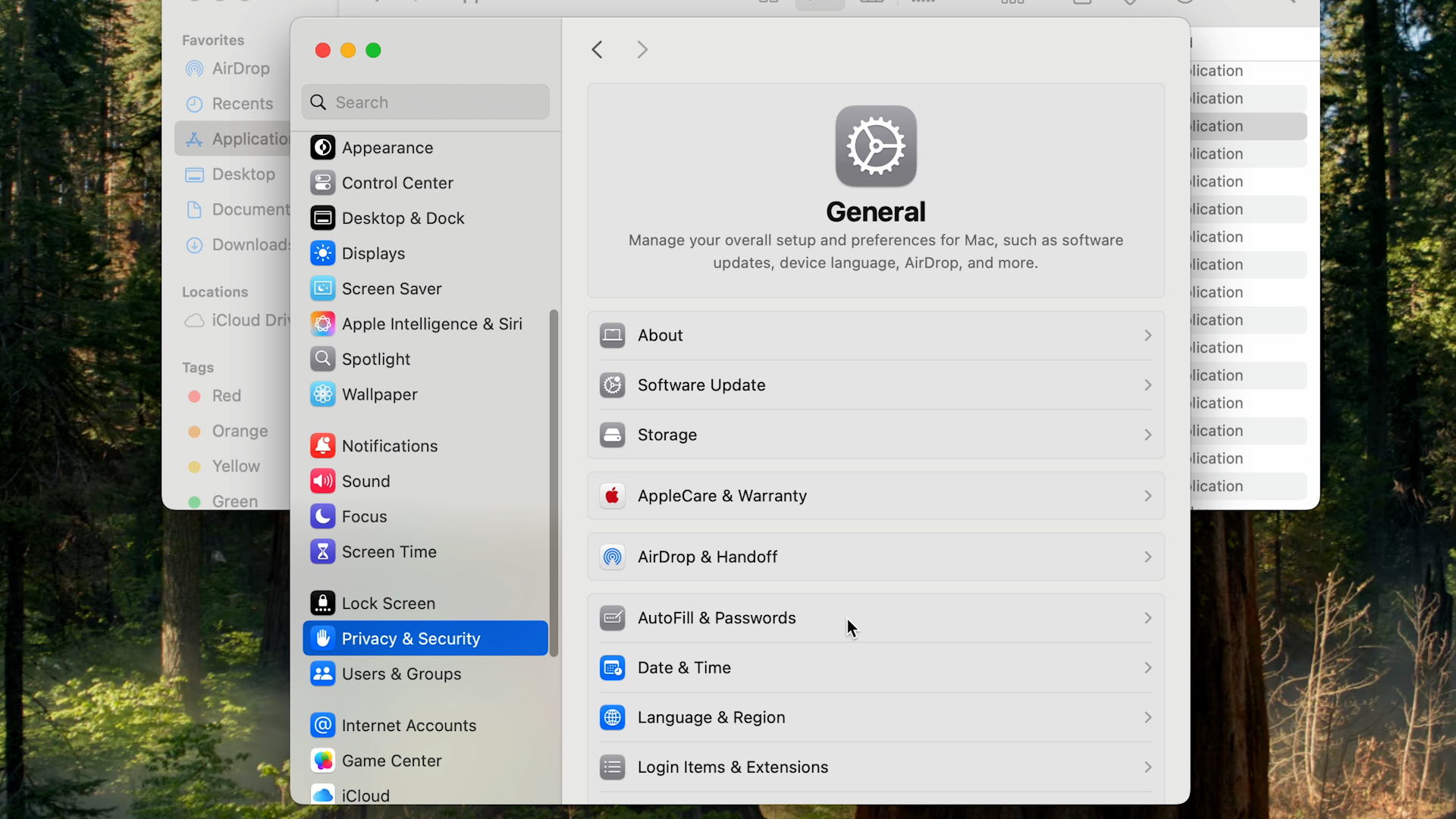
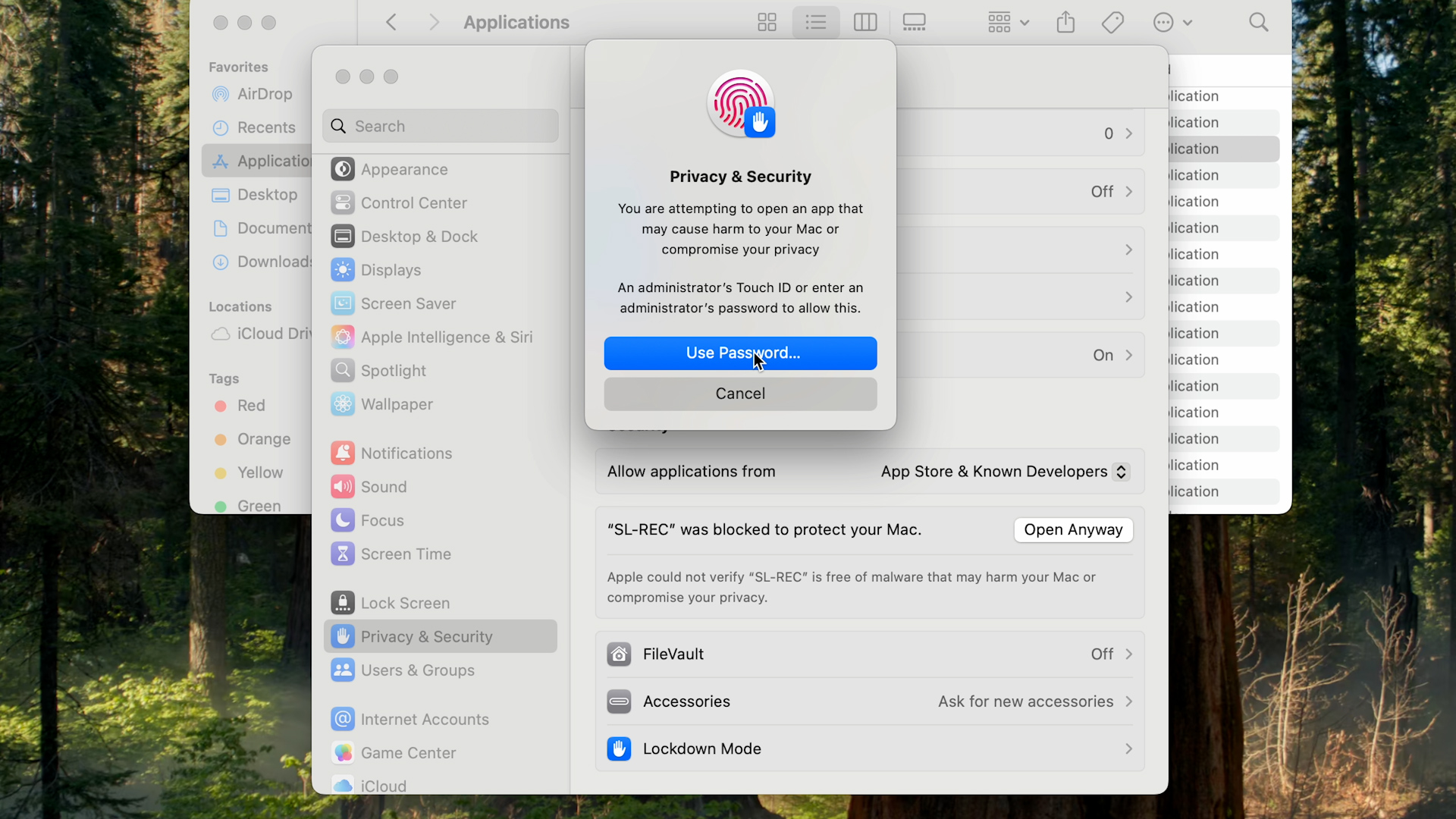
- „Dennoch öffnen": Systemeinstellungen → Datenschutz & Sicherheit öffnen, ganz nach unten scrollen. Bei „‚SL-REC.' wurde blockiert…" auf „Dennoch öffnen" klicken, mit Touch ID/Passwort bestätigen."Open Anyway": Open System Settings → Privacy & Security, scroll to the bottom. Next to "‘SL-REC.' was blocked…" click "Open Anyway" and confirm with Touch ID/password.
- Endgültig öffnen: Im letzten Dialog auf „Öffnen" klicken. Fertig – die Meldung kommt nie wieder.Open for good: In the final dialog click "Open". Done – the message never comes back.
Am Mac? Sicherheitseinstellungen direkt öffnen →On your Mac? Open Security settings directly →
Älterer Mac (macOS Sonoma 14 oder früher)? Kürzer: Rechtsklick (Ctrl-Klick) auf SL-REC. → „Öffnen" → „Öffnen" – ohne Umweg über die Einstellungen.Older Mac (macOS Sonoma 14 or earlier)? Shorter: right-click (Control-click) SL-REC. → "Open" → "Open" – no trip to Settings.
Sagt der Mac, die App sei „beschädigt" und solle in den Papierkorb, einmal im Terminal (Programme → Dienstprogramme → Terminal) ausführen, dann normal öffnen:If the Mac says the app is "damaged" and should be moved to Trash, run this once in Terminal (Applications → Utilities → Terminal), then open normally:
xattr -dr com.apple.quarantine /Applications/SL-REC.app
Reagiert nicht / „AbletonOSC" fehlt im DropdownNot responding / "AbletonOSC" missing
Zuerst Ableton einmal neu starten – war Ableton während der Installation schon offen, erscheint AbletonOSC erst nach einem Neustart.First, restart Ableton once – if Ableton was already open during install, AbletonOSC only appears after a restart.
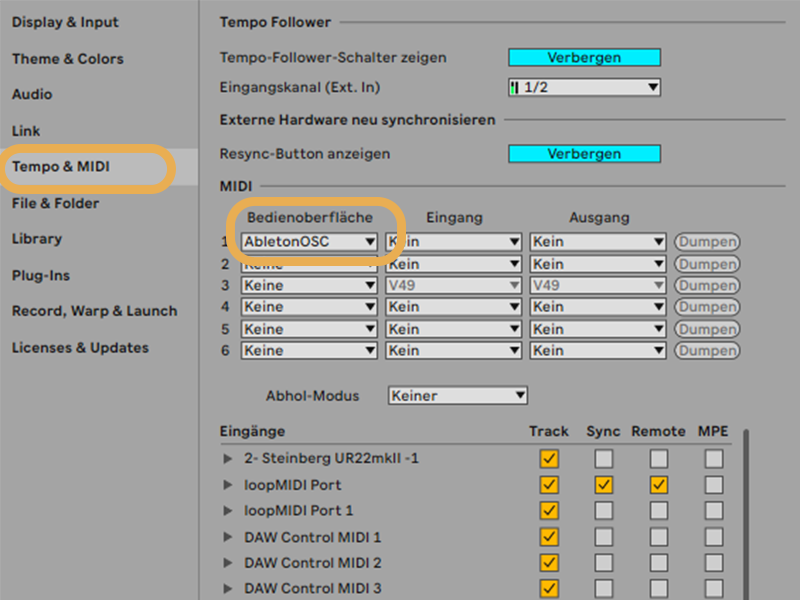
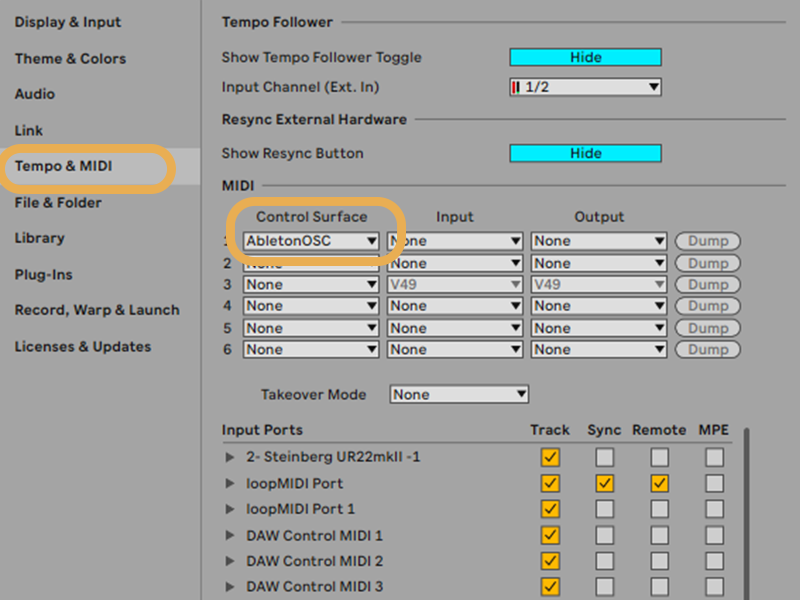
Läuft Ableton, und ist unter Einstellungen → Link/Tempo/MIDI → Bedienoberfläche wirklich AbletonOSC gewählt?Is Ableton running, and is AbletonOSC selected under Preferences → Link/Tempo/MIDI → Control Surface?
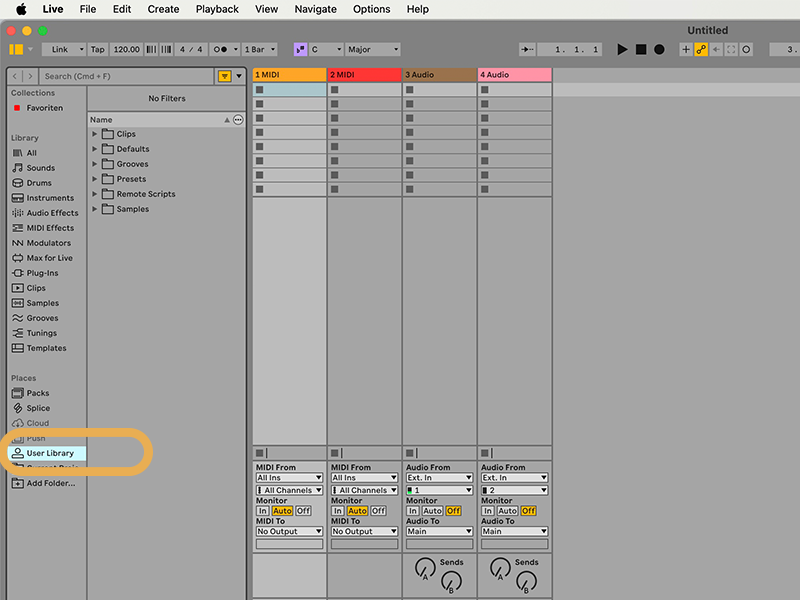
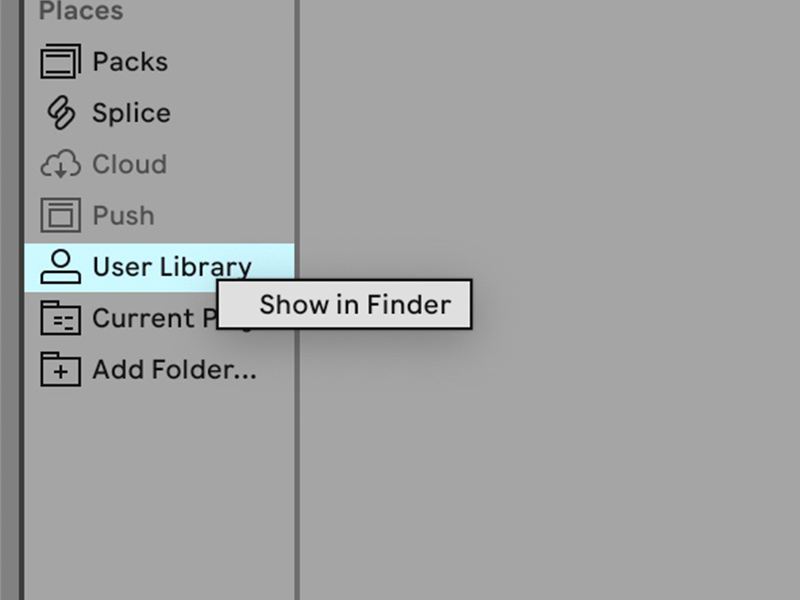
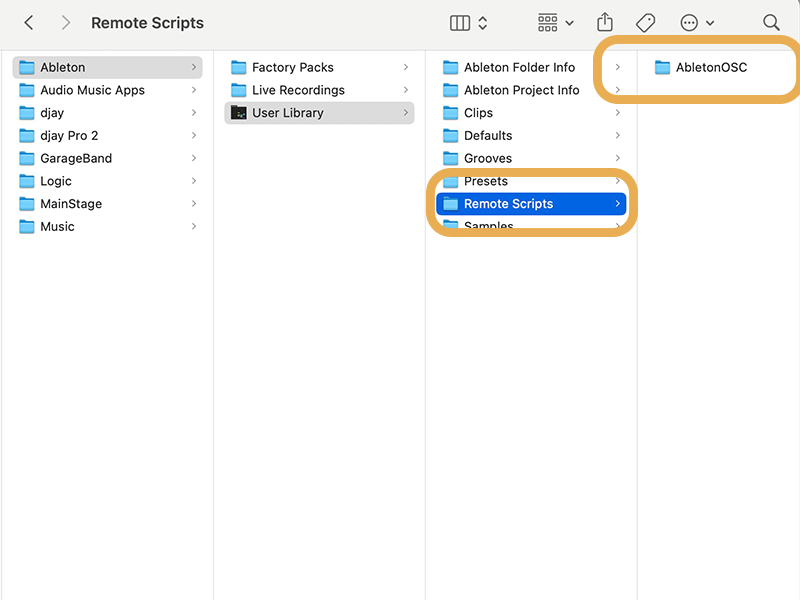
Fehlt „AbletonOSC" ganz? Dann lade es einfach separat herunter, entpacke es und kopiere den Ordner in Abletons „Remote Scripts"-Ordner:"AbletonOSC" missing entirely? Just download it separately, unzip it and copy the folder into Ableton's "Remote Scripts" folder:
AbletonOSC herunterladen (ZIP)Download AbletonOSC (ZIP)- Entpacken: Windows – Rechtsklick auf die ZIP → „Alle extrahieren". Mac – Doppelklick auf die ZIP (entpackt automatisch).Unzip: Windows – right-click the ZIP → "Extract All". Mac – double-click the ZIP (extracts automatically).
- Den entstandenen Ordner
AbletonOSCin den „Remote Scripts"-Ordner kopieren (Pfad je System unten). Er muss exaktAbletonOSCheißen und direkt eine__init__.pyenthalten.Copy the resultingAbletonOSCfolder into the "Remote Scripts" folder (path per system below). It must be named exactlyAbletonOSCand contain an__init__.pydirectly inside. - Ableton neu starten → Einstellungen → Link/Tempo/MIDI → Bedienoberfläche → AbletonOSC wählen.Restart Ableton → Preferences → Link/Tempo/MIDI → Control Surface → choose AbletonOSC.
Wohin der Ordner kommt – wähle dein System:Where the folder goes – pick your system:
Ziel-Ordner unter Windows:Destination on Windows:
Dokumente\Ableton\User Library\Remote Scripts
Mit OneDrive ggf. unter OneDrive\Dokumente\Ableton\…With OneDrive possibly under OneDrive\Documents\Ableton\…
In drei Schritten am Mac an die richtige Stelle:Three steps to the right spot on Mac:
Sprache wird nicht erkanntVoice isn't recognised
- Unten im Fenster das richtige Mikrofon gewählt?Is the correct microphone selected at the bottom?
- Nicht zu leise sprechen; sehr laute Umgebung kann stören.Don't speak too quietly; a very loud room can interfere.
Mikrofon-Berechtigung – je nach System:Microphone permission – depends on your system:
macOS
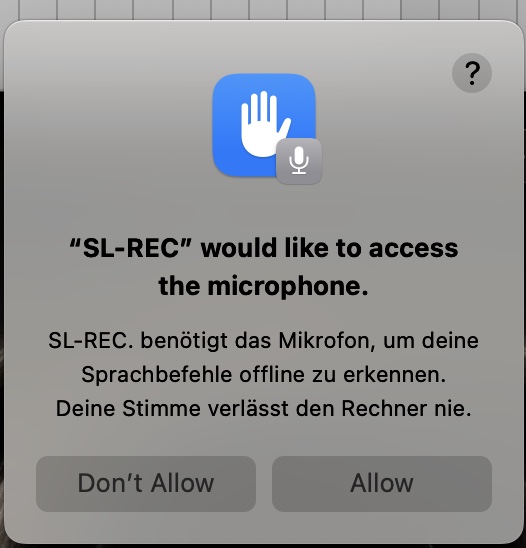
- Beim ersten Start fragt macOS in einem kleinen Fenster → auf „Erlauben"/„OK" klicken.On first launch macOS asks in a small dialog → click "Allow"/"OK".
- Versehentlich abgelehnt? Systemeinstellungen → Datenschutz & Sicherheit → Mikrofon → SL-REC. aktivieren, App neu starten.Declined by accident? System Settings → Privacy & Security → Microphone → enable SL-REC., restart the app.
Windows
- Kein Erlaubnis-Popup – Windows regelt das global in den Einstellungen.No permission popup – Windows handles it globally in Settings.
- Windows-Einstellungen → Datenschutz & Sicherheit → Mikrofon.Windows Settings → Privacy & security → Microphone.
- „Mikrofonzugriff" an und „Desktop-Apps den Zugriff auf Ihr Mikrofon erlauben" einschalten, App neu starten.Turn on "Microphone access" and "Let desktop apps access your microphone", then restart the app.
Kein Signal? Audio-Eingang einstellenNo signal? Set up your audio input
Damit SL-REC. aufnehmen kann, muss Ableton ein Eingangssignal bekommen. Hak die Checkliste für dein System & Setup ab – am Ende muss der Pegel-Meter ausschlagen, wenn du sprichst.For SL-REC. to record, Ableton needs an input signal. Tick off the checklist for your system & setup – at the end the level meter must move when you speak.
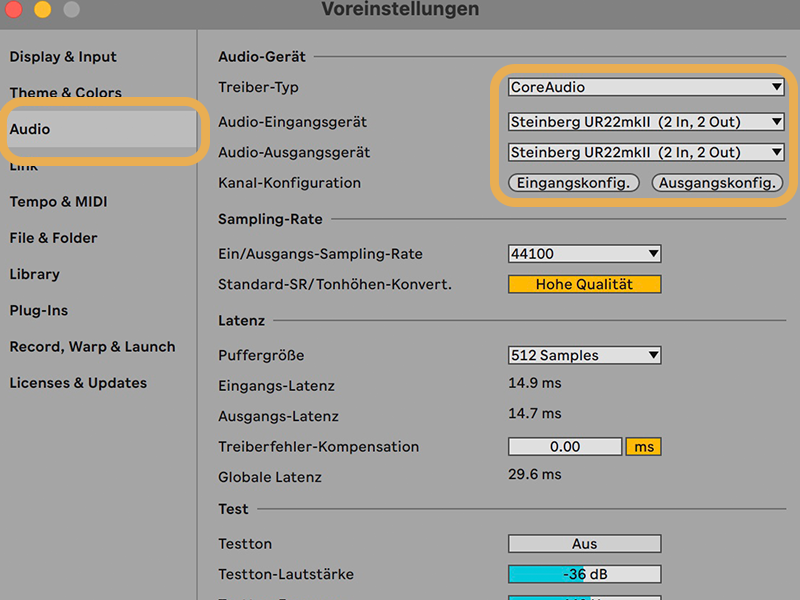
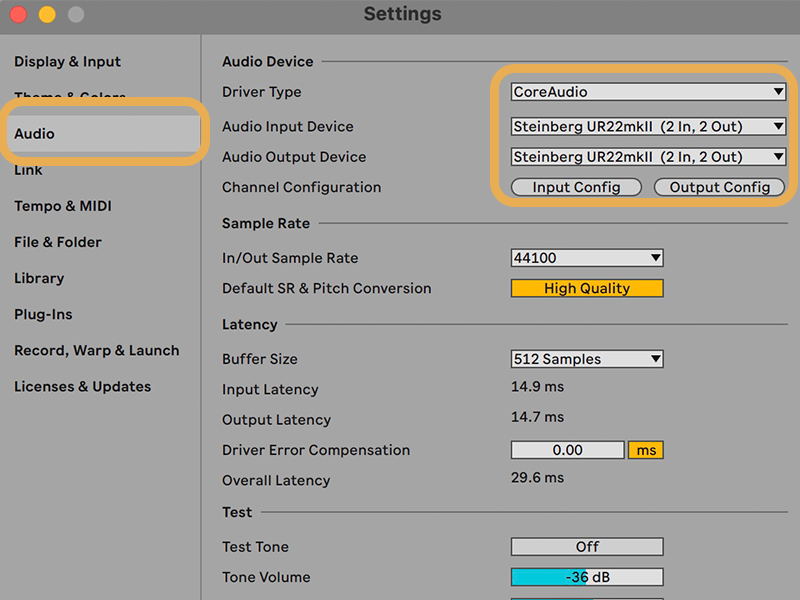
- Interface per USB anschließen & einschalten. Kondensatormikro? +48 V aktivieren.Connect interface via USB & power it on. Condenser mic? Enable +48 V.
- Ableton: ⌘+, → Audio → Audio-Eingabe-Gerät = dein Interface (Core Audio).Ableton: ⌘+, → Audio → Audio Input Device = your interface (Core Audio).
- „Eingangskonfig." öffnen → benötigte Eingänge aktivieren → Pegel muss ausschlagen.Open "Input Config" → enable the inputs you need → meter must move.
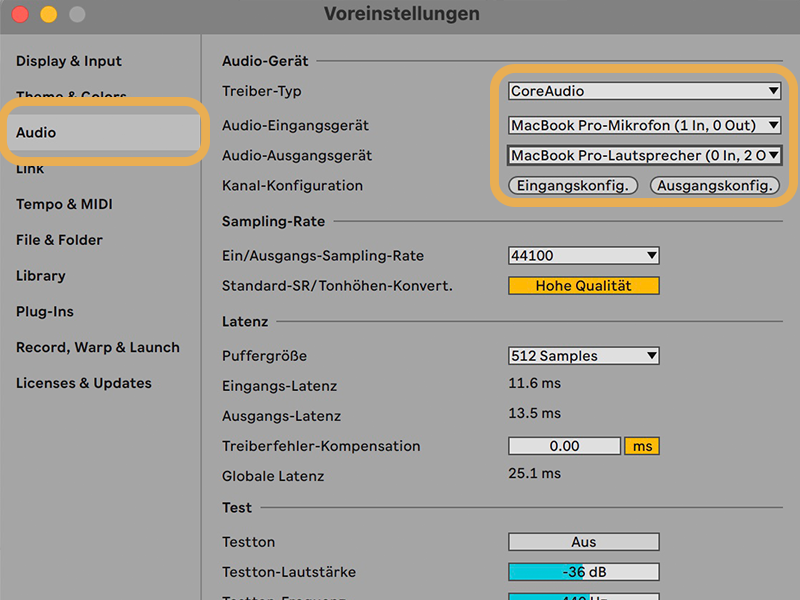
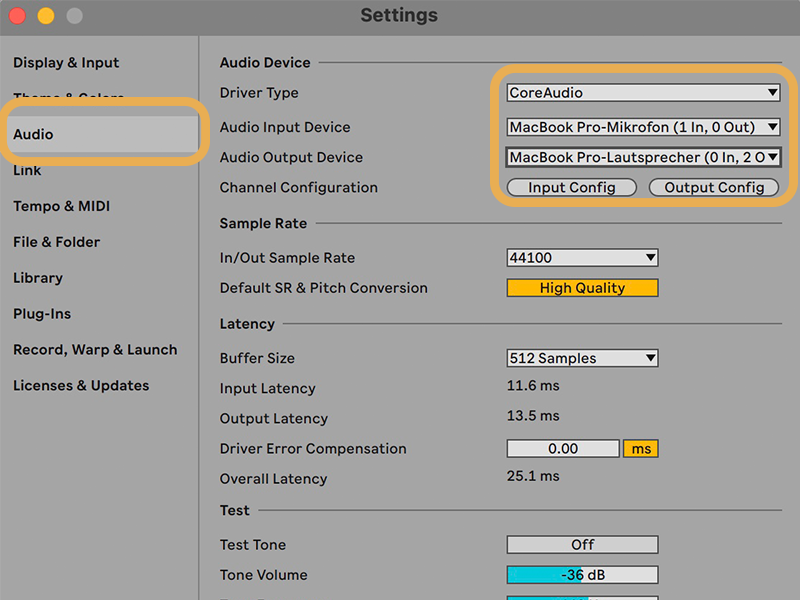
- Internes Mikrofon nutzen oder ein USB-Mikro anschließen (kein Interface nötig).Use the built-in mic or connect a USB mic (no interface needed).
- Ableton: ⌘+, → Audio → Audio-Eingabe-Gerät = „Built-in Microphone" bzw. dein USB-Mikro (Core Audio).Ableton: ⌘+, → Audio → Audio Input Device = "Built-in Microphone" or your USB mic (Core Audio).
- Ein- und Ausgabegerät prüfen: Eingabe = gewünschtes Mikrofon (Laptop oder USB), Ausgabe = Laptop-Lautsprecher bzw. Kopfhörer (falls angeschlossen).Check input & output device: input = the mic you want (laptop or USB), output = laptop speakers or headphones (if connected).
- „Eingangskonfig." öffnen → Eingang aktivieren → Pegel muss ausschlagen.Open "Input Config" → enable the input → meter must move.
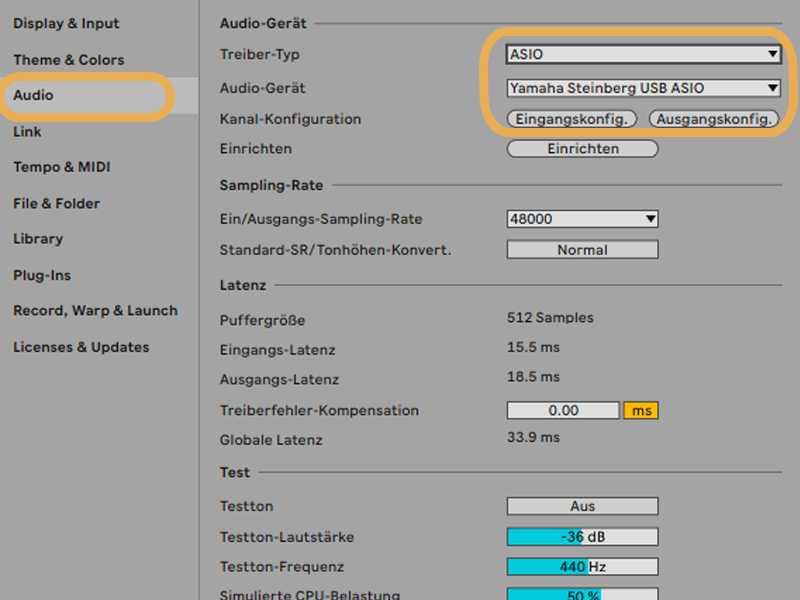
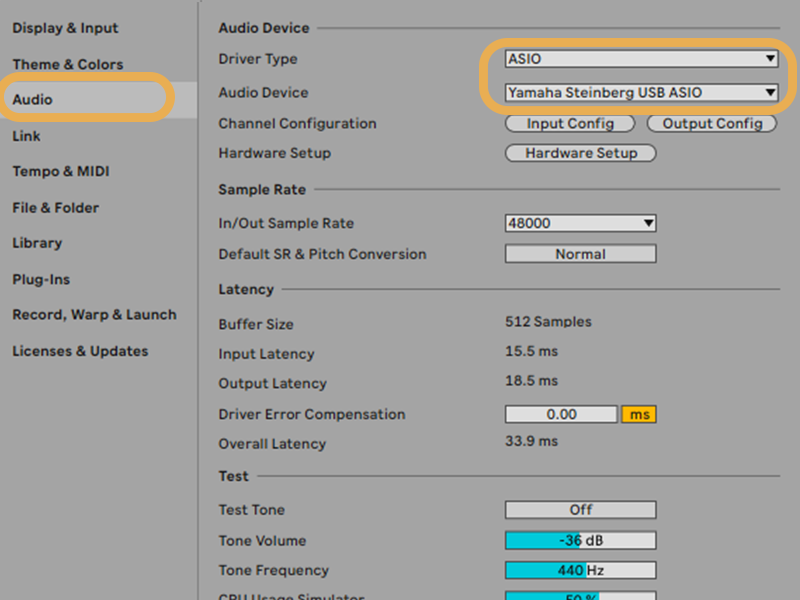
- ASIO-Treiber des Interface installieren, Interface anschließen & einschalten.Install the interface's ASIO driver, connect & power it on.
- Ableton: Strg+, → Audio → Treibertyp = ASIO, Audiogerät = dein Interface.Ableton: Ctrl+, → Audio → Driver Type = ASIO, Audio Device = your interface.
- „Eingangskonfig." öffnen → benötigte Eingänge aktivieren → Pegel muss ausschlagen.Open "Input Config" → enable the inputs you need → meter must move.
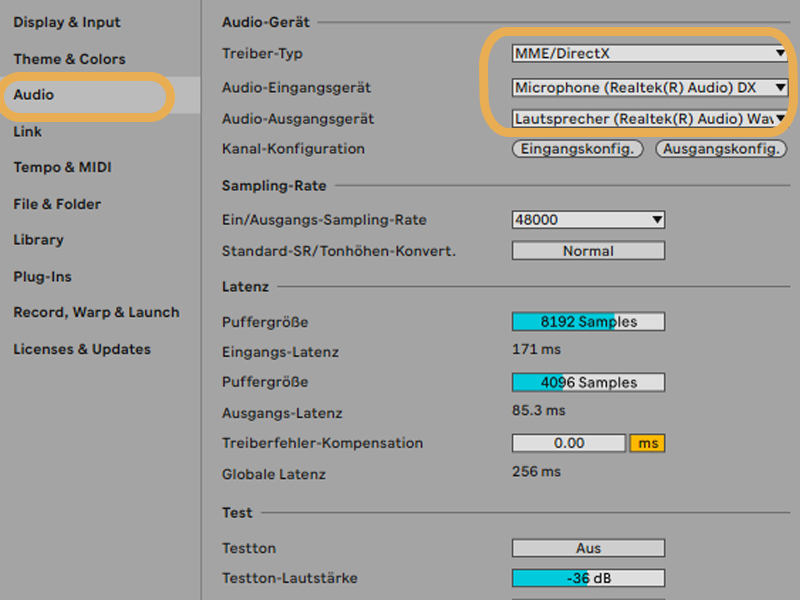
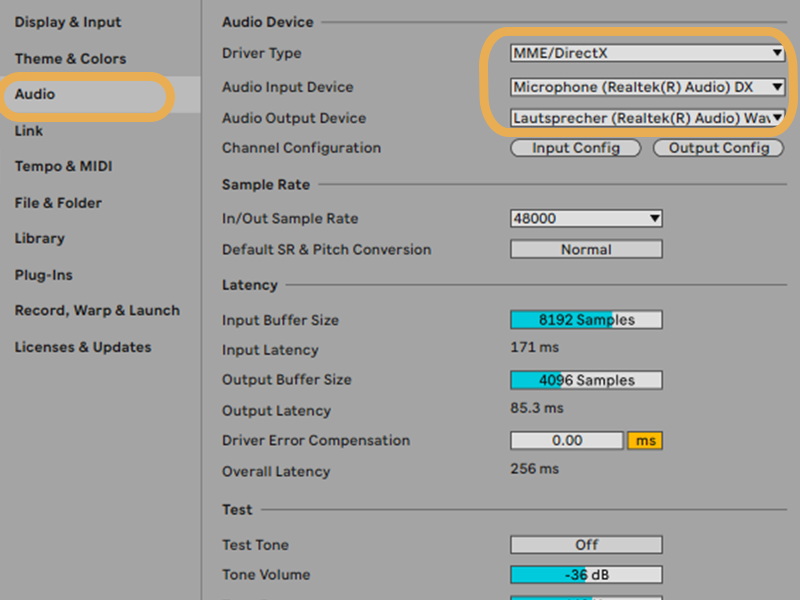
- Windows-Einstellungen → Datenschutz → Mikrofon → App-Zugriff erlauben.Windows Settings → Privacy → Microphone → allow app access.
- Ableton: Strg+, → Audio → Treibertyp = MME/DirectX (oder WASAPI), Eingabe = dein Mikrofon. Kein ASIO? → ASIO4ALL installieren.Ableton: Ctrl+, → Audio → Driver Type = MME/DirectX (or WASAPI), Input = your mic. No ASIO? → install ASIO4ALL.
- Ein- und Ausgabegerät prüfen: Eingabe = gewünschtes Mikrofon (Laptop oder USB), Ausgabe = Laptop-Lautsprecher bzw. Kopfhörer (falls angeschlossen).Check input & output device: input = the mic you want (laptop or USB), output = laptop speakers or headphones (if connected).
- „Eingangskonfig." prüfen → Eingang aktiv → Pegel muss ausschlagen.Check "Input Config" → input enabled → meter must move.
Ableton legt ungewollt Automation an / erstellt SpurenAbleton adds unwanted automation / creates tracks
Manchmal spinnt Ableton und legt beim Aufnehmen eine Automation an oder erstellt ab einer Stelle zusätzliche Spuren – das stört vor allem beim Durchnavigieren. Schalte vorher in Abletons Transportleiste den Automation-Arm (das „A") aus.Sometimes Ableton glitches and records an automation or creates extra tracks from a certain point – annoying especially when navigating. Turn off the Automation Arm (the "A") in Ableton's transport bar beforehand.
⌁ Weitere Fehler & Lösungen folgen nach den Tests. Problem nicht dabei? Schreib mir – dann nehme ich es auf.⌁ More issues & fixes will follow after testing. Problem not listed? Let me know and I'll add it.
ProfilProfile
Hi, ich bin Jannes — ich studiere Sound and Music Production an der Hochschule Darmstadt. SL-REC. ist meine Bachelorarbeit: Ich mache selbst Musik und wollte das Aufnehmen flüssiger machen, ohne ständig zur Maus oder Tastatur zu greifen. Und nebenbei soll SL-REC. das Aufnehmen auch denen öffnen, die mit Maus und Tastatur nicht gut zurechtkommen – etwa bei motorischen Einschränkungen.Hi, I'm Jannes — I study Sound and Music Production at Hochschule Darmstadt. SL-REC. is my bachelor's thesis: I make music myself and wanted recording to flow without constantly reaching for mouse or keyboard. And along the way, SL-REC. is meant to open recording up to people who can't comfortably use a mouse and keyboard – for instance with motor impairments.
Deshalb freue ich mich über jeden, der es testet und mir kurz Feedback gibt. 🙏So I'm grateful to anyone who tests it and shares quick feedback. 🙏
Offline & privatOffline & private
Spracherkennung läuft lokal (Vosk). Keine Cloud, keine Internetverbindung.Recognition runs on-device (Vosk). No cloud, no internet.
Hochschul-ProjektUniversity project
Bachelor-of-Arts-Arbeit zur Sprachsteuerung. Kein kommerzielles Tracking.A Bachelor of Arts thesis on voice control. No commercial tracking.
Mac & WindowsMac & Windows
Alle Ableton-Live-Editionen (Intro, Standard, Suite). Kein Max for Live nötig.Every Ableton Live edition (Intro, Standard, Suite). No Max for Live needed.
Schnell startklarQuick to set up
Der Installer legt alles an die richtige Stelle. Nur ein Klick in Ableton bleibt.The installer puts everything in place. Just one click in Ableton left.
Teste mit – jede Umfrage hilft.Test it – every survey helps.
SL-REC. ist mein Bachelor-Projekt. Ich wäre wirklich dankbar für jeden, der es testet. Die kurze Umfrage geht schnell – und dein Feedback hilft mir riesig. 🙏SL-REC. is my bachelor project. I'd be truly grateful to everyone who tests it. The short survey is quick – and your feedback means a lot. 🙏
Zur Umfrage →Take the survey →